You have an image that captures an idea. What if the lake began to ripple, the car drove through the corner, or the camera followed a turtle underwater? A short film can convey atmosphere and pace as well as appearance. It could open a presentation, develop an advertising concept or become a shot in a larger edit.
We compare three ways of tackling that task: Wan2.2, LightWan2.2 and LTX-2.5. Each receives the same starting image and description of the intended movement for its scene. One NVIDIA RTX PRO 6000 Blackwell Max-Q, with nominally 96 GB of video memory, handles the calculations. The brief calls for approximately 15-second films at 1280 × 704 pixels, with sound suited to the setting.
Start with the lakeside cabin, gravel rally or turtle above a reef. Each raises three practical questions: does the movement fit the idea, where could the result be useful, and how long does it take to prepare? Reproduction settings and measurement details are collected at the end for readers who want to go deeper.
The main findings
LTX-2.5 produced the fastest results in this series: its measured picture-and-sound stage took 1.2–1.5 minutes. LightWan2.2 took 2.6–2.7 minutes for the silent film; adding the separate audio stage brought the sum to 3.8 minutes for each scene. Wan2.2 with subsequent sound generation took 121.8–122.5 minutes. These are measurements from nine completed films and six separate audio stages, not predictions for every task.
Speed does not settle which clip best fits a project. In the sampled cabin frames, Wan and LightWan retain a similarly quiet composition, while LTX changes the mist and lighting more substantially. All three rally sequences suggest a return to another manoeuvre rather than one corner followed by a final departure. The turtle examples differ mainly in subject position, lighting and anatomical detail. These are observations from still-frame samples, not assessments of full-motion smoothness or sound.
Three variants, two model families
Image-to-video generation combines a still image with a written description of the action. The image provides appearance and composition; the text suggests what happens next: which way the car travels, whether the camera stays still and how much the water moves. It develops the idea without manually animating every object.
The result still needs reviewing: the model proposes how the scene develops, rather than executing a precise 3D animation plan. Wan2.2 is our reference profile. LightWan2.2 belongs to the same family but is prepared for a shorter calculation schedule. LTX-2.5 represents the second family and generates picture and sound together in the selected profile. These are three practical configurations from two model families, not three unrelated models.
All three starting illustrations are synthetic and were prepared outside the test server. They are creative examples, not recordings of real properties, competitions or animals. Wan and LightWan play at 16 frames per second; LTX plays at 24. More frames can make movement appear smoother, so keep that difference in mind while comparing the clips.
A lakeside cabin: can a quiet scene stay quiet?
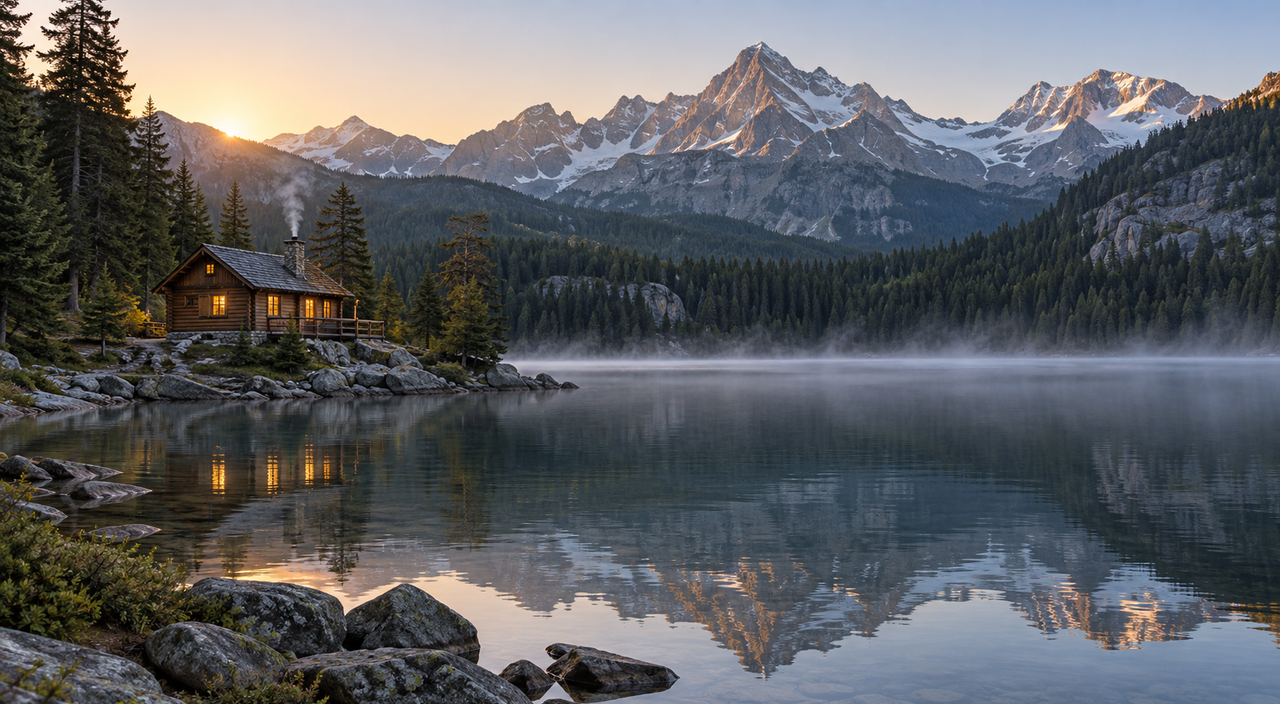
The first scene asks for restrained movement. Water ripples, a little mist drifts across the lake, and nearby branches move gently. The camera should remain still. The cabin and mountains should look like the same objects from beginning to end.
Imagine an opening slide about a retreat, a calm website background or a quiet passage in a promotional film. Movement should bring the composition to life without competing with the title or speaker. A still camera and subtle environmental changes matter more here than an elaborate fly-through.
Cabin and a quiet landscape
Input image
Each video has sound. Use the play control to start your chosen clip.
Clip details
1280 × 704 · 16 fps · Frames: 241 · Seed: 104729
Clip details
1280 × 704 · 16 fps · Frames: 241 · Seed: 104729
Clip details
1280 × 704 · 24 fps · Frames: 361 · Seed: 104729
An easy way to compare the versions is to choose a fixed point first: a window, the roof or the shoreline. Then turn to the mist and reflections. This helps separate intended movement from an accidental change in the scene. The sound brief calls for the same restraint: gentle water, a light breeze and distant birds.
In the frames inspected by the AI assistant, Wan and LightWan keep the recognizable cabin, mountain outline and shoreline in very similar positions. Changes concentrate on reflections, ripples and chimney smoke. LightWan ends with a more pronounced, curling plume; Wan's plume is narrower. Both retain the warm lighting and glowing windows, without an obvious large deformation of the building in these samples.
LTX takes a freer approach to the atmosphere. Mist grows thicker across the lake, and later frames are cooler and dimmer than the starting image. The cabin remains recognizable, but distant detail softens and the composition is less constant. This suggests two different visual directions: the Wan variants stay closer to the quiet starting composition, while LTX changes the mood more strongly. Still-frame inspection cannot establish a perfectly locked camera or smooth movement between samples.
Sound notes (machine analysis):
- Wan2.2: Audio-only analysis identified a gentle melody resembling piano or keyboard, while analysis with video reported no audible sound. The reports contradict each other and do not confirm the requested lakeside sounds.
- LightWan2.2: Audio-only analysis described a steady, gentle chime, while analysis with video mentioned music. The reports do not confirm water, wind or birds.
- LTX-2.5: Audio-only analysis identified a continuous, soft pad or drone resembling electronic ambience. The report with video described the scenery without useful audio observations, so it does not establish whether the sound matches the setting.
A rally car: movement is more than a sharp still frame
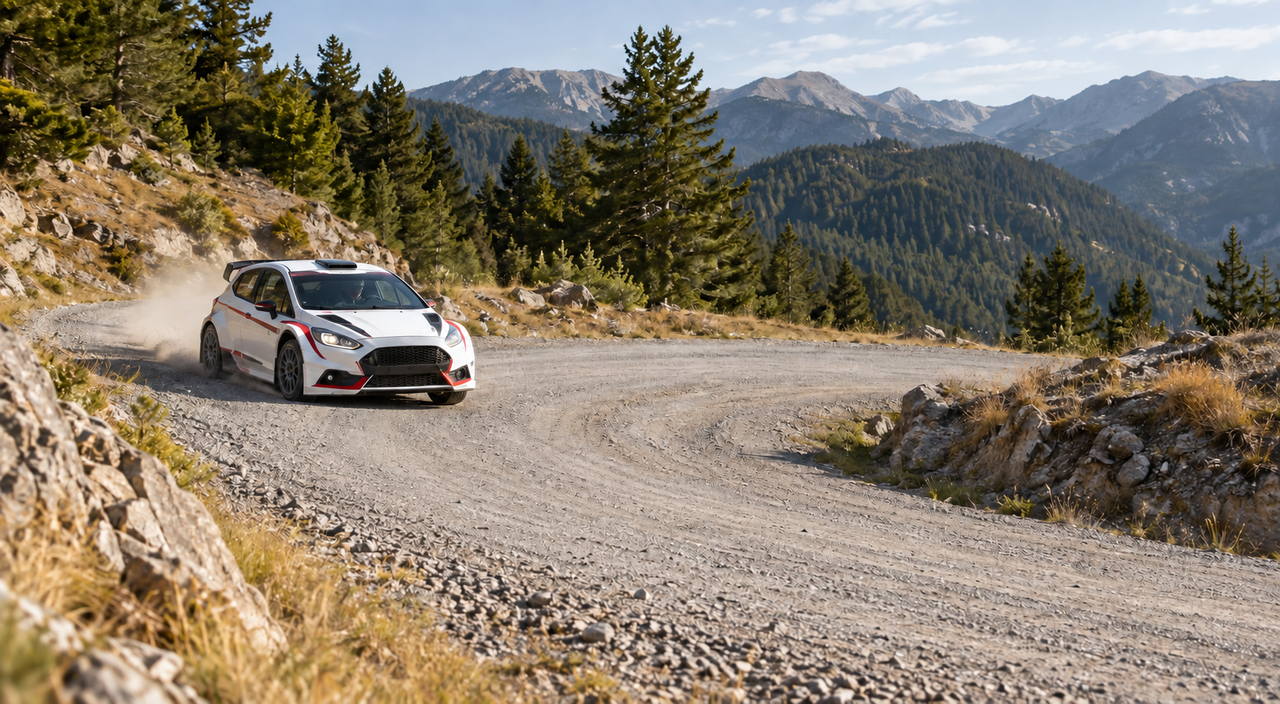
The second scene asks an unbranded rally car to enter a gravel corner, turn with a controlled slide, then straighten and accelerate. The camera follows the vehicle. Wheels, dust and direction of travel all need to agree.
A compelling individual frame is not enough for this task. The car must remain recognizably the same car as it moves, with plausible contact between its wheels and the road. The dust should follow the action rather than behave like an unrelated effect.
A car in motion
Input image
Each video has sound. Use the play control to start your chosen clip.
Clip details
1280 × 704 · 16 fps · Frames: 241 · Seed: 104729
Clip details
1280 × 704 · 16 fps · Frames: 241 · Seed: 104729
Clip details
1280 × 704 · 24 fps · Frames: 361 · Seed: 104729
A practical use is a moving sketch of an advertisement. Before committing to a full production, a team could explore the corner, camera movement and ending of the shot. A storyboard—the plan of successive shots—gains a sense of pace that a still illustration cannot provide.
Watch the beginning, middle and end of the turn separately. Is there a clear sequence of action? Does the vehicle remain the same car, with dust following behind it? Then turn on the sound: changing engine revs, tyres scraping gravel and scattering stones should support what is happening on screen rather than form an unrelated background.
The Wan and LightWan samples retain an identifiable white car with a red stripe, progressing through front, side and rear views with dust behind it. Around 8–10 seconds, the car appears front-facing again after moving away: the samples suggest another pass or manoeuvre, rather than the requested single turn and final departure. Some rear-body and wheel details also vary in LightWan. Number plates and small markings should not be treated as faithful vehicle-design details.
LTX presents a closer tracking interpretation, with the car occupying progressively more of the frame. Its route also turns back, and a later pass heads in the opposite screen direction. The white-and-red identity and large rear wing remain clear, but stripe and body-panel details change, while the surroundings appear soft or blurred. All three outputs could support a discussion about a dynamic storyboard, but none simply completes the entire requested sequence. The recurring action comes from generation; we did not add a loop in editing. Still frames cannot establish wheel rotation, driving physics or continuous movement between samples.
Sound notes (machine analysis):
- Wan2.2: Without video, the model identified engine revving and tyre squeals towards the end. Analysis with video broadly linked those sounds to the car, but does not establish precise synchronization.
- LightWan2.2: Audio-only analysis identified engine revving and tyre squeals; analysis with video referred to engine noise and wind only as possible sounds. Timing against specific manoeuvres was not confirmed.
- LTX-2.5: Audio-only analysis described an engine rising from a low hum to higher revs. The report with video does not compare particular sound events with the manoeuvres, so we make no assessment of precise synchronization.
A turtle above a reef: making underwater movement believable
The third scene moves into a different environment. The brief asks a sea turtle to glide over coral, with fish nearby, drifting particles and shifting sunlight on the seabed. The camera should follow gently rather than race past the subject.
The aim is not simply to add a blue tint. Consistent body shape, unhurried fin movement and a sense of distance between the turtle and the reef all contribute to a believable scene.
A turtle underwater
Input image

Each video has sound. Use the play control to start your chosen clip.
Clip details
1280 × 704 · 16 fps · Frames: 241 · Seed: 104729
Clip details
1280 × 704 · 16 fps · Frames: 241 · Seed: 104729
Clip details
1280 × 704 · 24 fps · Frames: 361 · Seed: 104729
This could be an illustrative sequence in a presentation, a concept for an educational project or a calm transition between sections of a film. Clear visual layers help the idea: the turtle leads the eye, while the reef, fish and light create its surroundings.
Follow one complete movement of the fins, then watch the background. Do the fish move independently? Does the light change gradually? The requested sound is a subdued underwater atmosphere—a different brief from the breeze and ripples beside the lake.
LightWan keeps the bright turquoise composition, sun rays and a large turtle close to its starting position. Flipper positions differ relatively little across many samples, although raised flippers and their pale undersides are visible around 11–12 seconds. This is a restrained interpretation, not a claim that the picture is frozen.
Wan's turtle recedes somewhat, with more pronounced changes in front-flipper position. The water and foreground become darker, and individual fish are harder to identify later. LTX retains the bright reef, but the turtle gradually recedes and turns towards a rear-side view. In later samples, the rear outline or obscured far flipper looks unusually narrow and elongated. These pictures do not establish whether that comes from perspective or an anatomical error. Each result retains a recognizable turtle, but still-frame inspection cannot confirm a correct complete swimming cycle or independent fish behaviour.
Sound notes (machine analysis):
- Wan2.2: Audio-only analysis identified a steady low rumble or distant engine; with video, the same sound was described as moving water and possible animal activity. This disagreement does not confirm natural underwater sounds or their synchronization with the shot.
- LightWan2.2: Without video, the model described a steady wind-like sound with an uncertain source; with video, it identified bubbles and possible marine-life sounds. The changed interpretation does not confirm those sounds or precise alignment with the action.
- LTX-2.5: The model associated the sound alone with a large engine idling, but described it as moving water when video was included. The conflicting reports cannot establish natural underwater ambience or precise synchronization with movement.
Sound that belongs to the scene
Wind beside a lake, an engine in a corner and muffled underwater sounds serve different purposes. We request environmental sound without speech or music: atmosphere and a connection to the visible action. The same examples can therefore appear in the Polish and English articles without switching narration languages.
LTX generates picture and sound together. Wan and LightWan first produce a silent film; LTX Retake adds environmental sound without changing the original picture. You can evaluate the movement first, then add its soundtrack. We compare complete workflows; sound comes from LTX in all three.
The short sound descriptions draw on machine analysis; visual notes draw on selected frames inspected by an AI assistant. This is not human listening or a full-motion human review. The players let readers compare the complete clips themselves; the methodology explains the scope of our assessment. Requesting “no music” guides the model but does not guarantee that result.
How long do you wait for a finished clip?
Fifteen seconds is the length of the film. Preparing it takes a separate amount of time, which is what this table measures. Video creation time covers model preparation through to a saved file, rather than just the generation steps. For LTX, that includes sound; for Wan and LightWan, it ends with the silent clip and the additional audio stage is listed separately.
The total is the sum of measured stages, not the full wait in a service: it excludes application startup, queues and assessment of the finished material.
| Scene | Variant | Video creation [min] | Separate audio [min] | Stage sum [min] |
|---|---|---|---|---|
| Lakeside cabin | Wan2.2 | 121.3 | 1.2 | 122.5 |
| Lakeside cabin | LightWan2.2 | 2.6 | 1.1 | 3.8 |
| Lakeside cabin | LTX-2.5 | 1.5 | joint with video | 1.5 |
| Gravel rally | Wan2.2 | 121.1 | 1.1 | 122.2 |
| Gravel rally | LightWan2.2 | 2.7 | 1.1 | 3.8 |
| Gravel rally | LTX-2.5 | 1.2 | joint with video | 1.2 |
| Turtle over a reef | Wan2.2 | 120.7 | 1.1 | 121.8 |
| Turtle over a reef | LightWan2.2 | 2.7 | 1.1 | 3.8 |
| Turtle over a reef | LTX-2.5 | 1.3 | joint with video | 1.3 |
When exploring an idea, the wait for the first film is useful. When preparing something to show, the video-plus-audio total matters. These are different parts of the creative process: first choose movement that suits the project, then assess the complete shot. The table does not include time spent watching, editing or making another attempt.
What the memory and energy figures mean
The test machine has 96 GB of system RAM. Its GPU has a separate 96 GB of video memory, usually called VRAM. These are different resources, not one interchangeable 192 GB pool. System RAM supports the application and operating system; VRAM holds data used by the graphics card's calculations.
The table shows the highest observed GPU-memory usage, separately for the video and subsequent audio stages. GiB is the unit reported by the measurement tools; GB describes the nominal hardware capacity.
| Scene | Variant | VRAM: video [GiB] | VRAM: separate audio [GiB] | GPU energy: sum [Wh] |
|---|---|---|---|---|
| Lakeside cabin | Wan2.2 | 81.1 | 77.7 | 607.7 |
| Lakeside cabin | LightWan2.2 | 53 | 77.7 | 16.2 |
| Lakeside cabin | LTX-2.5 | 29.2 | joint with video | 4.9 |
| Gravel rally | Wan2.2 | 81.1 | 77.7 | 606.4 |
| Gravel rally | LightWan2.2 | 53 | 77.7 | 16.2 |
| Gravel rally | LTX-2.5 | 29.2 | joint with video | 4.5 |
| Turtle over a reef | Wan2.2 | 81.1 | 77.7 | 606.2 |
| Turtle over a reef | LightWan2.2 | 53 | 77.7 | 16.3 |
| Turtle over a reef | LTX-2.5 | 29.2 | joint with video | 4.7 |
Read these figures alongside the timings: together they describe memory use and energy consumed during the task. Watt-hours, or Wh, cover the GPU board only—not the whole server or its electricity bill. The methodology explains the measurement boundaries and handling of missing readings.
Choosing a useful starting point
Start with the job, not the model name. A designer exploring an advertising idea may primarily need quick drafts. An editor preparing a quiet opening will focus on composition. For a sports sequence, a clear progression of action may matter more than the detail in one frame.
If the priority is quickly exploring an idea with picture and sound, LTX has the shortest measured stage in this series: 1.2–1.5 minutes. It may, however, move further from the starting lighting and composition, as in the cabin scene, or need careful anatomical checking, as with the turtle. The short turnaround provides something to assess sooner, not automatic approval for a finished production.
LightWan is a practical starting point here for quick silent drafts: 2.6–2.7 minutes, or a 3.8-minute stage sum with sound. Its cabin samples keep a similarly restrained composition to Wan, and its turtle stays close to the bright starting picture. Separate sound generation does increase observed VRAM usage from 53 GiB for the film to 77.7 GiB during Retake. Resource planning therefore needs to cover the complete workflow, not just its fast video stage.
Wan's configuration means more than two hours of measured stages per scene. That cost should be justified by a specific feature sought in the result, rather than an assumption that longer calculations produce a better film. For the rally scene, none of the three variants shows an unambiguous ending matching the brief in these samples. A precisely planned car advertisement would therefore need a separate review of the complete action and vehicle geometry. These examples are most useful for comparing concepts, not as ready-made references for faithful product animation.
A dedicated GPU server provides a place to work with different variants and control their settings. A useful next step is to choose a representative image and a simple brief: one subject movement, a defined camera position and a clear ending. That makes it easier to judge whether the clip moves the project towards a usable result.
Planning similar experiments? Explore the server configuration for video work. These results describe specific settings and examples, not a guaranteed completion time for every project.
Practical questions
For shorter shots and the effect of resolution, see our earlier Wan2.2 test at 480p and 720p. It explores different subjects: products and an interior. This comparison focuses on longer scenes, different generation workflows and sound.
Can one good clip become a five-minute film?
A longer film can be planned as multiple shots followed by editing, but this comparison does not establish five-minute, single-shot generation. Maintaining the same character or object across shots introduces further work. Multiplying a 15-second timing figure is not a reliable delivery estimate for that production.
Will a product keep its exact appearance?
That needs checking in the output. Logos, small details, geometry and motion can be important to a commercial product presentation. An attractive concept is not automatically an accurate representation of the item being sold.
What about commercial use?
Wan's code and the pinned LightWan model card specify Apache-2.0. Check the licences of the actual weights and additional components too.
LTX-2.5 uses the LTX-2.x Community License, as identified in its repository. Commercial use requires a paid licence at annual revenue of at least US$10 million, including entities covered by its common-control definition. Other conditions still apply below that threshold and also cover Retake audio. This summary does not establish a company's eligibility: check the terms for the intended use, distribution or service before deployment.
Technical details
This section collects the methodology and settings needed to reproduce the comparison.
Inputs, profiles and one result per task
The comparison covers three scenes and three variants: one final film per pair, giving nine clips. Wan and LightWan then receive six separately measured audio stages. Pilot runs check that the setup works and are excluded from the final results. The tables include completed runs only; a run interrupted before producing a valid file is repeated with the same settings, with its logs retained. We do not quietly select the best-looking clip from repeated attempts. One run shows one result, not an average, median or the variation between runs.
Within each scene, the variants share a normalized 1280 × 704 PNG, the main description and seed 104729. Generation guidance does not work identically across architectures. Wan also receives a negative prompt: a list of unwanted visual characteristics. The selected distilled LightWan and LTX profiles do not use one. The seed records a random starting choice, not identical noise between models or byte-identical output on another software stack. Exact code revisions, weights and settings belong in the reproduction record.
| Variant | Calculation profile | Frames and playback | Audio |
|---|---|---|---|
| Wan2.2 | I2V-A14B, 20 steps, FP16 diffusion experts; scaled-FP8 UMT5 text encoder | 241 frames, 16 fps | Separate LTX Retake |
| LightWan2.2 | 4 steps, distilled NVFP4 diffusion profile, sparse attention | 241 frames, 16 fps | Separate LTX Retake |
| LTX-2.5 | Distilled NVFP4 transformer profile, 8 steps at 640 × 352 and 3 refinement steps at 1280 × 704 | 361 frames, 24 fps | Joint with picture |
LTX uses spatial enlargement between stages and a Conv VAE decoder. Reference material includes the Wan documentation, LightWan configuration and LTX pipeline. Steps are not interchangeable units of work: dividing 20 by four predicts neither speed nor quality. This compares complete configurations, not the effect of one option.
The final-series Wan sampling settings were fixed during pilot preparation using the pinned official template: Euler/simple, 20 steps, CFG 3.5, shift 8 and a 10 + 10 split between experts. We request 241 frames instead of the template's 81, testing a longer shot. These are settings, not evidence of their effect on a particular visual feature. FP16 describes Wan's diffusion experts, not the whole software stack. Likewise, NVFP4 does not mean every LightWan or LTX component operates in four bits.
The details needed to reproduce the comparison are linked in protocol.json and workflows.json: software versions, dependencies, settings and checksums. They also describe compatibility changes made in a separate build copy. Original sources and the change history are preserved.
Preparing the playback files standardizes the MP4 header without re-encoding the video. Exact comparisons of packets, timestamps and every decoded frame verify that the film and its playback speed remain unchanged; source files are retained.
The native outputs contain 241 frames at 16 fps for Wan/LightWan and 361 frames at 24 fps for LTX. Rounded for display, their durations are 15.1 seconds and 15 seconds. The raster is 1280 × 704, not full 1280 × 720. Clips are not extended through loops, interpolation, repeated frames, stitching or altered playback speed.
Timing boundaries and audio provenance
Every final clip starts in a fresh application process, without a model retained from the preceding task. The operating system's file cache is not cleared. Compiled GPU-kernel caches, which may be populated during pilots, are retained too. This is neither the first run in a newly installed environment nor the response time of an already-loaded production API. Summed stage times exclude queues and gaps between tasks.
Timing covers preparing the model, processing the starting image and description, generation, turning the model's output into frames, and saving the MP4. Creating the starting illustrations, downloading weights, starting the program and importing its libraries, bulk file verification and final media assessment are excluded. A little task-management overhead remains inside the measured interval. Creating a model object in the program does not necessarily load all its data; some may be read later. The separate Retake measurement covers model preparation, audio generation, required processing—including video decoding whose output is discarded—saving the original WAV, signal checks, AAC encoding and combining the tracks.
Retake receives a dedicated description of the sounds for each scene. Its input pictures, frame count and text guidance differ from joint LTX generation, so the results do not isolate the sound-generation method alone.
Adding sound through LTX Retake leaves the original picture unchanged. The model's video branch receives zero added noise, and the final MP4 uses the original video stream rather than Retake's internal reconstruction. We check packets, timestamps and decoded frames, retaining both the silent film and the unchanged generated WAV. Sound may naturally finish up to 40 ms before the picture; the actual gap is recorded without adding silence or shortening the film. If sound runs longer, only an excess tail of up to 0.5 seconds may be cut when combining the tracks.
In each of the six separate audio stages, the generated waveform ends 12.5 ms before the picture. We retained that natural difference without adding silence, stretching the audio or changing its gain.
Calculating energy use and checking results
Energy use comes from GPU power readings during the same stage timed in the table. We assume power changes linearly between readings: technically, trapezoidal integration with interpolated boundaries. Readings must cover the start and end, with no gap longer than 5 seconds; otherwise energy is marked unavailable. Peak VRAM comes from readings for that stage, including those bracketing its boundaries. A very brief memory spike between readings may go undetected. One GiB is 2³⁰ bytes.
GPU-board energy excludes the CPU, fans, storage and power-supply losses. If one stage has no valid measurement, the video-plus-audio total remains unavailable, not zero. Values are added at full precision and then displayed with at most one decimal place, so adding displayed values can differ slightly from the displayed total. Minutes and seconds are also rounded independently from the original measurements.
System-wide RAM, process memory and framework allocation counters are different measurements. Wan's host-RAM observation uses actual per-job samples inside the measured interval; missing samples are not replaced with a configured memory limit or an allocator counter.
An accepted result requires confirmed completion, stopped workloads, completed controlled cooldown, matching inputs and settings, and retained files with verified hashes. These checks establish a completed run and file integrity, separately from assessing the content itself.
How we assessed picture and sound
Qwen2.5-Omni-7B first analysed the sound alone, without the picture or a hint about the intended scene. In a separate pass, it analysed sound alongside two video frames per second. Questions covered recognizable sounds, their connection to the picture, possible speech or music, and uncertainty. These are two separate analyses by the same model, not two expert opinions.
An AI assistant also inspected still frames: one per second, from the opening to the fourteenth second, plus a full-resolution frame at 14 seconds. Descriptions cover visible objects, changes in shape and composition. Scene notes separate those observations from the sound report.
This is neither human listening nor full-motion viewing. Sampled pictures cannot establish precise synchronization for every sound. The model can miss or misidentify events, so its report cannot guarantee the absence of speech, music or defects. Suitability for a particular project still needs a review of the complete clip.
The procedure and completed assessment scope are linked in review-method.json. Assessment happens outside the generation measurement and is not added to clip-creation time in the table. We retain disagreements between the reports: describing an event in the picture does not prove that the same event is audible.
A short glossary
I2V means video generated from an image. Frames per second describe playback; a step is part of a model's calculation. VRAM is the GPU's memory. Distillation prepares a model for fewer calculation steps; quantization stores some numbers more compactly. Sparse attention reduces selected internal calculations of relationships. A text encoder turns the description into data for the model; a decoder turns the internal representation into visible frames or sound.